

Arctic Drive Car Parts and Repair Guide
Diagnose an Arctic Drive car that will not start, overheats or is damaged without inventing hidden stats or universal part compatibility.
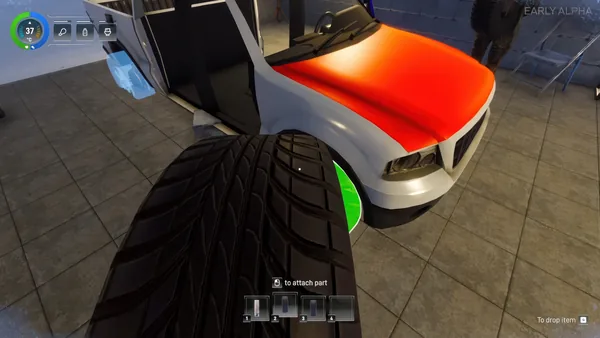
Check the failure by system: fuel and battery for starting, oil and a water-filled radiator for engine survival and cooling, fitted wheels for movement, and doors for cabin warmth. Use a repair kit for damage when the emergency-repair prompt is available; replace parts only after checking that the candidate fits the current vehicle.
Step-by-step checklist
- Identify the symptom before moving parts: no start, overheating, no movement, crash damage or cabin cold.
- For a no-start condition, confirm fuel and a fitted battery before assuming the engine is broken.
- For overheating risk, inspect the radiator and its water; inspect engine oil separately.
- For crash damage, look for the emergency-repair controls and use a repair kit only on the target the prompt identifies.
- After changing a part, test close to shelter and keep the original part until the replacement is known to fit.
Diagnose one system at a time
Arctic Drive simulates separate vehicle parts, so a car that does not work should not be reduced to a single health bar. The official overview establishes part-by-part maintenance; the Demo snapshot supplies readable purpose text for batteries, engines, radiators, oil, repair kits and different tire types.
Repair kits and emergency repair
Patch v0.13.14 added control guidance for the emergency-repair mechanic. A developer gameplay presentation shows searching a point of interest for a repair kit after a crash, then returning to the vehicle. This supports the repair loop, not a guaranteed kit location.
Part compatibility remains a manual check
The cleaned files retain model labels such as Reno, Warden and N100, but the complete slot-compatibility graph was not decoded. Do not assume that every engine, wheel, door or steering wheel fits every car solely because its name is similar.
The first sedan is not a tow vehicle
In an October 8 developer reply, the team states that the first car has no hitch and cannot tow a friend or trailer. Trailers become mobile bases for crafting, cooking and storage once a compatible vehicle is available.
Numbers still require a live test
Repair capacity text exists in the Demo files, but IndieTome has not measured how it maps to damaged parts. Fuel use, electrical drain, temperature thresholds and part-health values remain unpublished until a repeatable Build 25843608 test is recorded.
Evidence-backed repair checks
| Symptom | Check first | Evidence boundary |
|---|---|---|
| Engine will not start | Fuel, battery, fitted engine | Battery requirement is in Demo item text; no exact charge threshold is published. |
| Engine may overheat | Radiator and radiator water | Official v0.13.12 notes add water to Demo radiators; exact temperature values remain unknown. |
| Engine condition falls | Motor oil and crash damage | Demo item text warns that driving without oil destroys the engine; consumption rate is unknown. |
| Vehicle will not move cleanly | Fitted wheels and surface | Wheel type affects grip; exact handling statistics are not decoded. |
| Cabin loses warmth | Missing or open doors | The official Demo trailer says doors keep cold out and warmth in. |
| Part is damaged | Repair-kit prompt | Emergency-repair controls are confirmed in patch notes; repair capacity is file-observed, not runtime-tested. |